AI Automation Β· Enterprise UX Β· n8n

Designing a Secure AI-Powered Ticket Creation System

How I designed an AI workflow that converts emails into structured Jira tickets with authorization checks, human oversight, and enterprise-grade safety controls.
Company

Company

Year

Year

Duration/Year

My Role

My Role

Type

Spiegel Institut GmbH

2026

UX Designer Β· AI Builder

Solo Project

Context

Teams often receive requests via email and manually create tickets in Jira. This process is repetitive, time-consuming, and prone to human error. To address this, I designed an AI-powered workflow using n8n that automatically converts emails into structured Jira tickets β€” while maintaining security and keeping humans in control.

Goal

Design a system that automates ticket creation from emails, ensures only authorized users can trigger it, maintains accuracy using AI, and prevents risky actions through human oversight.

[ Image β€” n8n workflow canvas screenshot ]

[ Image β€” n8n workflow canvas screenshot ]

Solution

Solution


[ Image β€” n8n workflow canvas screenshot ]

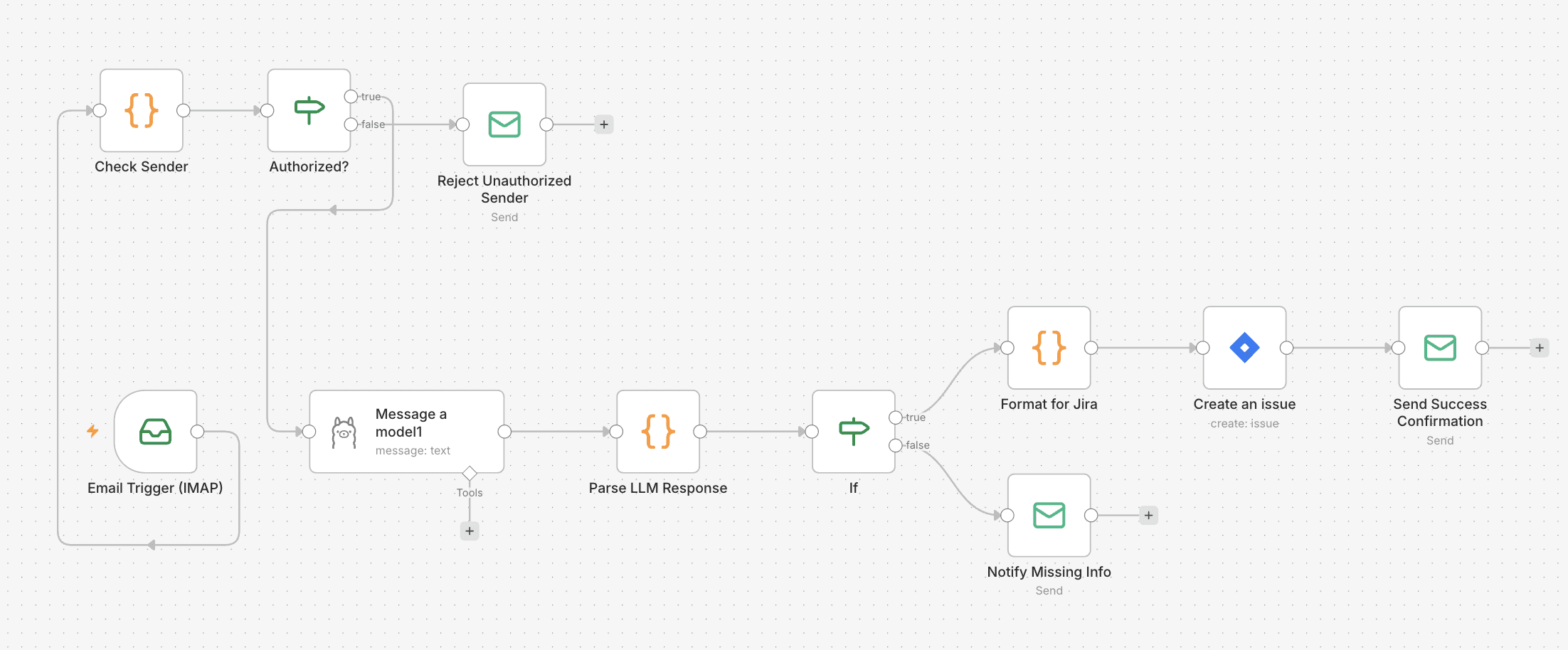
System Workflow

01

Email input

User sends an email to a dedicated address to trigger the workflow.

02

AI processing

LLM extracts the issue summary, description, and priority from the email content.

03

Authorization check

System verifies sender identity. Unauthorized senders receive a clear response with next steps to request access.

04

Ticket creation

AI generates a clean, structured ticket and adds it automatically to Jira.

05

Risk control

Destructive actions like deletion are never automated. They always require a human to confirm.

[ Image β€” full workflow diagram ]

[ Image β€” full workflow diagram or n8n flow visualization ]

[ Image β€” full workflow diagram or n8n flow visualization ]


1. Authorization Layer

  • Prevents unauthorized ticket creation

  • Adds security and control

2. AI-Based Content Understanding

  • Converts unstructured emails into structured data

  • Improves consistency across tickets

3. Human-in-the-Loop Control

  • AI assists but does not fully control the system

  • Critical actions require manual approval


1. Authorization Layer

  • Prevents unauthorized ticket creation

  • Adds security and control

2. AI-Based Content Understanding

  • Converts unstructured emails into structured data

  • Improves consistency across tickets

3. Human-in-the-Loop Control

  • AI assists but does not fully control the system

  • Critical actions require manual approval


1. Authorization Layer

  • Prevents unauthorized ticket creation

  • Adds security and control

2. AI-Based Content Understanding

  • Converts unstructured emails into structured data

  • Improves consistency across tickets

3. Human-in-the-Loop Control

  • AI assists but does not fully control the system

  • Critical actions require manual approval

Key Features

πŸ”

πŸ”

Authorization layer

Prevents unauthorized ticket creation. Every sender is verified before any action is taken, adding a critical layer of enterprise security.

πŸ€–

πŸ€–

AI content understanding

Converts unstructured email text into clean, structured ticket data β€” improving consistency across all tickets without manual formatting.

πŸ‘€

πŸ‘€

Human-in-the-loop

AI assists but critical actions always require manual approval β€” keeping humans accountable at every step.

Challenges Identified

AI misinterpretation

Vague or ambiguous emails can cause the AI to assign wrong priority or context to a ticket.

Lack of transparency

Users don't see how the AI interpreted their request and have no way to review before ticket creation.

Automation risk

Deleting or modifying tickets automatically is unsafe β€” human confirmation must always be required.

Binary authorization

The current system is either fully allowed or fully blocked β€” no role-based permissions for partial access.

To improve the system, I designed the following enhancements:

✳️ 1. AI Review Interface

Before ticket creation:

  • Show AI-generated:

    • Title

    • Description

    • Priority

User can:

  • Approve

  • Edit

  • Reject

πŸ‘‰ Reduces errors and builds trust

✳️ 2. Confidence Indicator

Display AI confidence level:

  • High β†’ auto-create

  • Medium β†’ suggest review

  • Low β†’ require approval

πŸ‘‰ Helps users decide when to trust AI

✳️ 3. Smart Authorization Feedback

Improve rejection experience:

Instead of generic message:

Provide reason + next steps

Example:

  • β€œYou are not authorized to create tickets for this project.”

  • β€œContact admin@example.com”

✳️ 4. Safe Deletion Flow

Instead of blocking completely:

  • AI suggests:

    β€œThis ticket may be a duplicate. Delete?”

  • User must confirm

πŸ‘‰ Keeps control while improving efficiency

✳️ 5. Role-Based Access (Future Improvement)

Different permission levels:

  • Basic user β†’ create tickets

  • Manager β†’ set priority

  • Admin β†’ delete tickets

πŸ‘‰ More realistic enterprise model

To improve the system, I designed the following enhancements:

✳️ 1. AI Review Interface

Before ticket creation:

  • Show AI-generated:

    • Title

    • Description

    • Priority

User can:

  • Approve

  • Edit

  • Reject

πŸ‘‰ Reduces errors and builds trust

✳️ 2. Confidence Indicator

Display AI confidence level:

  • High β†’ auto-create

  • Medium β†’ suggest review

  • Low β†’ require approval

πŸ‘‰ Helps users decide when to trust AI

✳️ 3. Smart Authorization Feedback

Improve rejection experience:

Instead of generic message:

Provide reason + next steps

Example:

  • β€œYou are not authorized to create tickets for this project.”

  • β€œContact admin@example.com”

✳️ 4. Safe Deletion Flow

Instead of blocking completely:

  • AI suggests:

    β€œThis ticket may be a duplicate. Delete?”

  • User must confirm

πŸ‘‰ Keeps control while improving efficiency

✳️ 5. Role-Based Access (Future Improvement)

Different permission levels:

  • Basic user β†’ create tickets

  • Manager β†’ set priority

  • Admin β†’ delete tickets

πŸ‘‰ More realistic enterprise model

To improve the system, I designed the following enhancements:

✳️ 1. AI Review Interface

Before ticket creation:

  • Show AI-generated:

    • Title

    • Description

    • Priority

User can:

  • Approve

  • Edit

  • Reject

πŸ‘‰ Reduces errors and builds trust

✳️ 2. Confidence Indicator

Display AI confidence level:

  • High β†’ auto-create

  • Medium β†’ suggest review

  • Low β†’ require approval

πŸ‘‰ Helps users decide when to trust AI

✳️ 3. Smart Authorization Feedback

Improve rejection experience:

Instead of generic message:

Provide reason + next steps

Example:

  • β€œYou are not authorized to create tickets for this project.”

  • β€œContact admin@example.com”

✳️ 4. Safe Deletion Flow

Instead of blocking completely:

  • AI suggests:

    β€œThis ticket may be a duplicate. Delete?”

  • User must confirm

πŸ‘‰ Keeps control while improving efficiency

✳️ 5. Role-Based Access (Future Improvement)

Different permission levels:

  • Basic user β†’ create tickets

  • Manager β†’ set priority

  • Admin β†’ delete tickets

πŸ‘‰ More realistic enterprise model

UX Enhancements Proposed

01

[ Mockup ]

01

[ Mockup ]

AI review interface

Before a ticket is created, show the user the AI-generated title, description, and priority. Let them approve, edit, or reject β€” reducing errors and building trust in the system.

[ Mockup ]

02

[ Mockup ]

02

[ Mockup ]

Confidence indicator

Display the AI's confidence level. High confidence auto-creates. Medium suggests review. Low requires manual approval β€” helping users decide when to trust the system.

[ Mockup ]

03

[ Mockup ]

03

[ Mockup ]

Smart authorization feedback

Instead of a generic rejection, provide a reason and clear next steps β€” such as a contact email to request access. Improves experience for legitimate users who are incorrectly blocked.

[ Mockup ]

04

[ Mockup ]

04

[ Mockup ]

Role-based access (future)

Different permission levels for different users β€” basic users create tickets, managers set priority, admins can delete. A more realistic model for enterprise deployment.

[ Mockup ]

πŸ“Š Impact


This system improves:

  • ⚑ Speed β€” reduces manual effort

  • πŸ“ Consistency β€” structured ticket generation

  • πŸ” Security β€” authorization control

  • ⚠️ Safety β€” human validation for critical actions


This system improves:

  • ⚑ Speed β€” reduces manual effort

  • πŸ“ Consistency β€” structured ticket generation

  • πŸ” Security β€” authorization control

  • ⚠️ Safety β€” human validation for critical actions


This system improves:

  • ⚑ Speed β€” reduces manual effort

  • πŸ“ Consistency β€” structured ticket generation

  • πŸ” Security β€” authorization control

  • ⚠️ Safety β€” human validation for critical actions


Faster

From manual email handling to automated structured output in seconds

Secure

Authorization layer blocks unauthorized access at every step of the workflow

Human-centered

Critical actions always require human confirmation β€” AI assists, never replaces

Relevance to Enterprise Systems

Enterprise platforms like SAP require strict authorization, auditability, human oversight, and reliable workflows. This project demonstrates how AI can be integrated into such systems responsibly β€” maintaining control and trust while delivering real efficiency gains.

Takeaway


  • Design full UI for review and approval flow

  • Add audit logs for tracking decisions

  • Implement role-based permissions

  • Improve AI accuracy with feedback loops


  • Design full UI for review and approval flow

  • Add audit logs for tracking decisions

  • Implement role-based permissions

  • Improve AI accuracy with feedback loops


  • Design full UI for review and approval flow

  • Add audit logs for tracking decisions

  • Implement role-based permissions

  • Improve AI accuracy with feedback loops

Next Steps

01

03

02

04

01

02

03

04

01

Design a full UI for the review and approval flow

02

Add audit logs for tracking all automated decisions

03

Implement role-based permissions

04

Improve AI accuracy through user feedback loops

Interested in working together? I will love to hear from you.

Contact

Muhammad Amin Β© 2026